

Email remains one of the most valuable channels in a marketer’s toolkit, but getting a campaign approved can still be surprisingly complicated. A single newsletter or product launch email may pass through a copywriter, marketing manager, product lead, legal reviewer, and client before it’s ready to send.
That’s where the process can start to break down. Feedback comes in at different stages, versions change, and it becomes harder to tell what has actually been approved.
A well-defined email approval workflow, however, can help prevent that. In this guide, we’ll look at:
- What an efficient email approval workflow should include
- Where email approvals tend to get messy
- How marketing teams can make the process more organized without adding more chaos.
What Is an Email Approval Workflow?
An email approval workflow is the process an email follows from the first draft through review, revisions, and final sign-off before it’s scheduled or sent.
The exact workflow will depend on the type of email and the people involved. A weekly newsletter might only need approval from a marketing manager, while a product launch email could require input from product, brand, or legal teams.
Why Email Approval Processes Get Messy
Email approvals usually become difficult as more people, revisions, and review stages are added to the process. Without a clear workflow, it becomes harder to know what still needs attention and when an email is actually ready to send.
Some of the most common issues include:
- Too many reviewers without clear roles: When everyone reviews everything, feedback gets duplicated, conflicting opinions appear, and it’s unclear who has final approval authority.
- Feedback arrives at different stages: Comments may come during copy review, after the email is designed, or following a test send, leaving the campaign owner to reconcile feedback from several rounds.
- Multiple versions are in circulation: Subject lines, call-to-action (CTAs), offers, and body copy change throughout production, making it easy for someone to review an outdated version.
- Changes happen after approval: A last-minute edit to pricing, product details, or legal language can make an earlier approval outdated and require another review.
- The same process is used for every email: A routine newsletter and a major product announcement don’t always need the same reviewers or number of approval stages.
The good news is that most of these problems can be avoided with a clearer process. Let’s take a look at what an effective email approval workflow looks like, step by step.👇
A Practical Email Approval Workflow in 7 Steps
1. Define the Email and Required Approvers
Before anyone starts reviewing copy, decide what kind of email you’re working on and who actually needs to approve it.
If it’s a monthly newsletter, you may only need a marketing manager to approve it. If you’re launching a new product or feature, you might require input from product, legal, brand, or leadership teams. For agency work, the final approver may be the client.
At this stage, define:
- The campaign owner
- Required reviewers and approvers
- Who has final sign-off
- The review deadline
- Any specialist checks, such as legal or compliance
Avoid adding people “just in case.” Every extra reviewer can introduce another round of comments, so each person should have a clear reason for being involved.
2. Draft the Complete Email Copy
Where possible, review the email as a complete piece rather than approving isolated sections at different times.
The draft should include all the copy that affects how the message is understood, such as:
- Subject line
- Preview text
- Headline
- Body copy
- Calls to action
- Offer details
- Product information
- Required disclaimers
This gives reviewers the full context and reduces the risk of approving the body copy while an unreviewed subject line or CTA changes the meaning of the campaign.
3. Complete the First Internal Review
Before the email reaches senior stakeholders, the legal team, or a client, it should go through an internal marketing review. This is where the team makes sure the draft is already in strong shape and catches issues that don’t need to involve additional approvers.
The reviewer should look at the email as a whole:
- Does the message support the campaign goal?
- Is the positioning consistent with the rest of the campaign?
- Is the tone right for the audience and brand?
They should also verify practical details such as product information, dates, pricing, promotional terms, links between the email and landing page, and whether the CTA accurately reflects what happens next.
If several team members are involved, give each person a clear responsibility. For example, an editor might focus on clarity and brand voice while the campaign owner verifies the offer and supporting details. The aim is to resolve routine issues internally so later reviewers can focus on the decisions that actually require their input.
4. Route the Email to the Right Stakeholders
Once the email is internally ready, send it to the people whose approval is genuinely required.
The order matters. If a legal team is likely to request changes to claims or promotional language, it usually makes sense to get that review before asking an executive or client for final sign-off.
A typical sequence might look like:
Newsletter: Marketing manager → Final approval
Product launch: Marketing → Product → Legal → Marketing lead
Agency campaign: Internal team → Account lead → Client
Also, each stakeholder involved in the approval process should know what they’re expected to check, which version they’re reviewing, and when feedback is due.
5. Consolidate Feedback and Create a Revised Version
Once feedback comes in, avoid making changes piecemeal while multiple reviewers are still commenting. That can create new versions before the current review round is even finished.
Instead:
- Gather feedback from the current round
- Resolve conflicting comments
- Decide which changes will be made
- Update the copy once
- Create a clearly identifiable revised version
If two reviewers disagree, the campaign owner should resolve that conflict before sending another draft around. Otherwise, the team can end up cycling between competing edits.
For substantial revisions, send the updated version back to the people whose feedback was affected. Reviewers should always know whether they’re seeing a first draft, revised copy, or a version intended for final approval.
6. Build and QA the Final Email
Once the copy is approved, move it into your email platform and complete technical QA.
This is a separate step from content approval. Approval confirms that the message is correct; QA confirms that the email has been implemented properly.
Before sending, check:
- Links and buttons
- Personalization fields
- Tracking
- Images
- Mobile and desktop rendering
- Sender name and reply-to address
- Dynamic content
- Accessibility basics
Compare the final build against the approved copy rather than assuming everything was transferred correctly. Small production changes can easily introduce new errors, especially when copy is reformatted or adjusted to fit the design.
7. Triple Check Everything
Before the campaign is scheduled, confirm that the final email still matches what stakeholders approved.
The campaign owner should be able to answer three questions:
- Have all required approvers signed off?
- Were all requested changes incorporated?
- Does the final build match the approved version?
If the answer to all three is yes, the email is ready to move forward. If anything material has changed since approval, route it back to the relevant reviewer before scheduling so the final sign-off still applies to the version being sent.
How Gain Can Help With Email Copy Approvals
Gain is a marketing content approval tool that helps teams review content, collect feedback, and get the right sign-offs in one place.
With Gain’s document approval feature, you can upload email copy in formats your team already uses, including Word, PDF, RTF, plain text documents, and web content links. From there, you can send the content through a customizable approval workflow and add the stakeholders who need to review it at each stage.
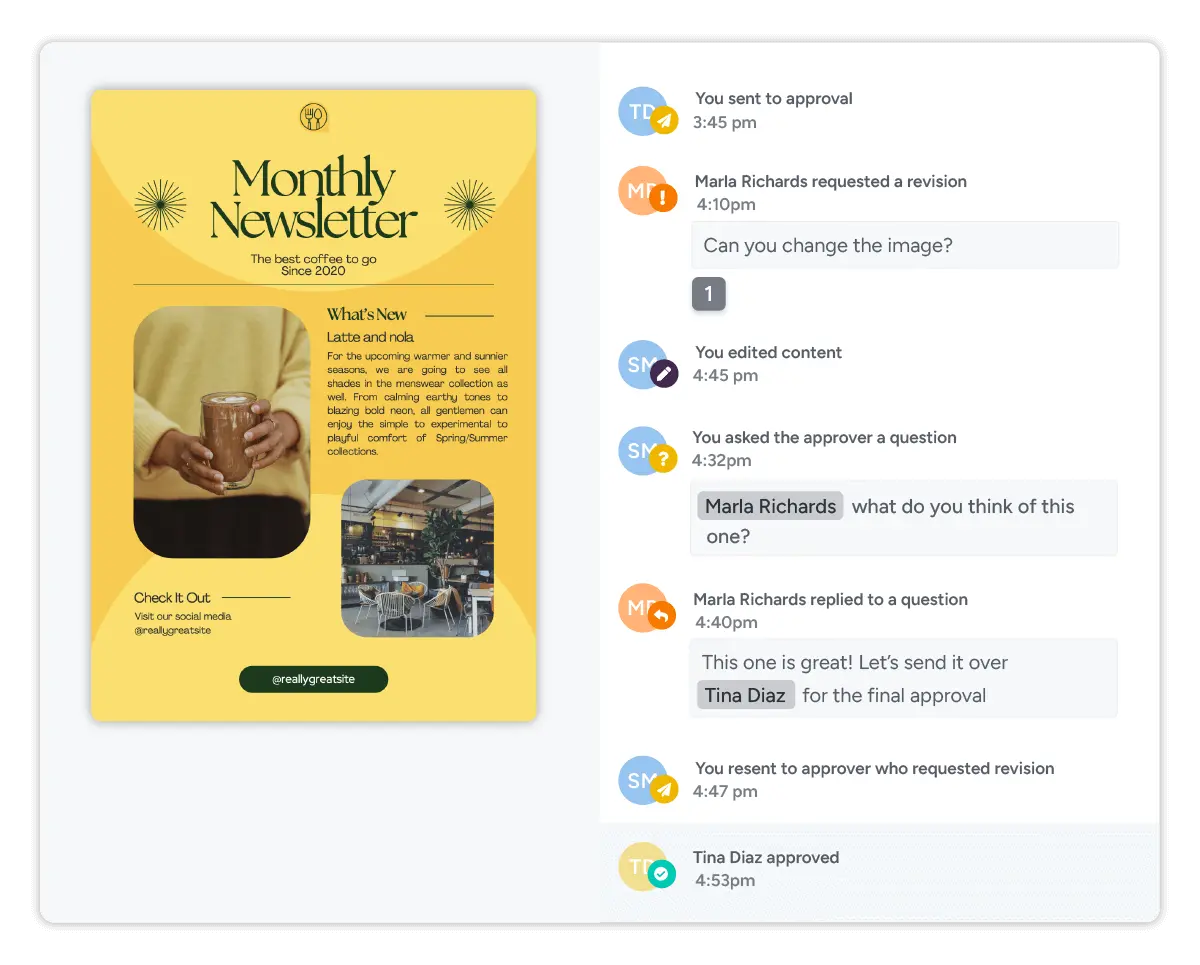
For example, you might route a monthly email newsletter from the marketing team to product, then to legal, and finally to a client or senior approver. Each person can review the content, request changes, or approve it, while Gain keeps a time-stamped record of revisions and approval decisions.
What’s also great is that Gain sends automatic approval reminders when a stakeholder still owes feedback or sign-off, so campaign owners spend less time following up manually. Reviewers can approve content or request changes with one click, which makes it easier to keep each review round moving without adding friction for internal or external approvers.
Give Your Email Campaigns The Same Level of Care You Give to Your Other Marketing Content
If you already have a proper approval workflow for your social media posts, your email campaigns deserve the same attention. After all, they carry the same brand voice, offers, product details, and sometimes the same legal or compliance risks.
That doesn’t mean every email needs a complicated approval chain. It just means there should be a clear way to make sure the right people have seen the right version before it goes out.
If your current process could use a little more structure, start a free trial of Gain and keep email approvals organized in one place.